VLAN Trunking for Broadband and IPTV: A Practical Design Pattern
A single Ethernet cable can carry broadband and IPTV without merging the two services. The reusable idea is to keep them as separate Layer-2 domains, tag both domains on the shared link, and remove the appropriate tag only at the intended access port.
This is a design pattern, not a device-specific recipe. VLAN identifiers, service modes, authentication, DHCP behavior, and multicast requirements are assigned by the provider and must be confirmed from authorized documentation.
The design problem
An optical network terminal or modem may expose broadband and IPTV as separate service circuits. The router may terminate the broadband session—for example, with PPPoE—while a set-top box expects the IPTV circuit as a bridged Ethernet service.
When only one physical link is available between the provider edge and the router, a VLAN-aware trunk can carry both circuits. The trunk solves a cabling problem; it does not convert one service into the other and does not create an application playlist or an over-the-top video service.
The Layer-2 model
The OpenWrt VLAN documentation distinguishes tagged trunk ports from untagged access ports. Applied here, the model has four roles:
- Provider-facing service edge: keeps the broadband and IPTV circuits distinct.
- Shared trunk: carries both logical networks as tagged frames over one physical cable.
- Router or managed switch: associates each tag with the correct logical interface or bridge.
- Service access port: presents only the IPTV domain, normally untagged, to the receiver.
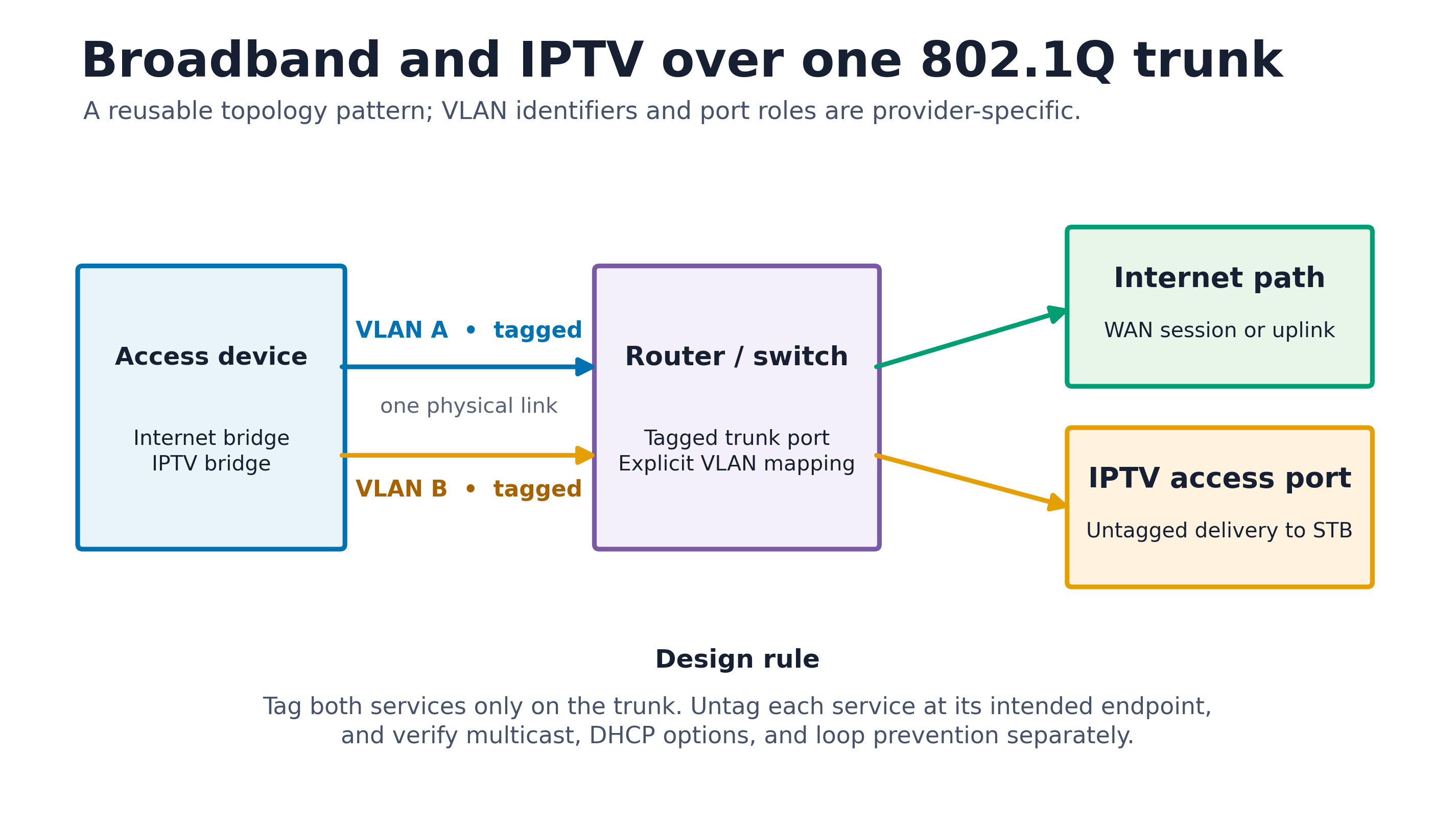
The diagram deliberately omits real VLAN identifiers, port names, addresses, credentials, and device screenshots. Those values are deployment data, not part of the general pattern.
Traffic roles and boundaries
Broadband path
The broadband VLAN belongs to the router’s WAN role. If the provider uses PPPoE, the PPPoE client terminates there; if it uses DHCP or another method, that provider-defined method belongs there instead. Normal WAN firewalling and routing remain separate from IPTV bridging.
IPTV path
The IPTV VLAN is usually mapped to a dedicated bridge or access port for the receiver. Do not attach it to the ordinary LAN bridge unless the provider’s design explicitly requires routing and the firewall policy has been reviewed. A bridged IPTV circuit and an M3U playlist solve different problems and should not be treated as interchangeable.
Management path
Device administration needs an independent, tested path. Preserve at least one management interface or local recovery method while changing VLAN membership. The shared trunk should carry only the service VLANs that are intentionally allowed on both ends.
A vendor-neutral deployment sequence
- Export the current device configurations and confirm that local recovery is possible.
- Obtain the service VLAN assignments, tagging expectations, and access method from the provider or authorized equipment documentation. Do not copy identifiers from another subscriber or an online screenshot.
- At the provider edge, map each authorized service circuit to its own VLAN without exposing the management plane.
- Configure the inter-device link as a tagged trunk for exactly those service VLANs.
- On the router, bind the broadband VLAN to the WAN service and keep the IPTV VLAN in a separate bridge or interface.
- Configure the receiver-facing port as an untagged member of the IPTV VLAN with the matching PVID; it should not also be an untagged member of the normal LAN.
- Apply one boundary at a time and verify that management access remains available before proceeding.
The exact OpenWrt representation depends on whether the device uses DSA, an older switch model, or separate Ethernet interfaces. Treat the hardware’s current documentation as authoritative rather than translating port names mechanically between platforms.
Multicast is a separate concern
Many IPTV systems deliver channels with IP multicast. A working VLAN trunk proves only that Layer-2 connectivity exists. Efficient multicast may additionally require correct IGMP membership handling, a querier on the relevant domain, or an IGMP proxy when traffic is deliberately routed between interfaces.
RFC 4541 explains how IGMP-snooping switches use membership information to constrain multicast forwarding and why incorrect snooping behavior can either flood traffic or suppress wanted streams. Enable snooping or proxying only when the provider’s topology requires it; neither feature repairs an incorrect VLAN boundary.
Security and operational limits
- VLAN tags provide traffic separation, not encryption or authentication.
- Never connect the trunk directly to an untrusted endpoint or expose device administration on a service VLAN.
- Permit only the required VLANs on the trunk and remove unused port membership.
- Keep broadband WAN policy, IPTV bridging, and management access as distinct roles.
- Use authorized administrative access; do not bypass provider controls or publish device credentials.
- Retain a rollback configuration and a local recovery path before changing the only management link.
Verification checklist
- The trunk carries only the intended tagged service domains.
- The WAN service establishes through the broadband VLAN using the provider-defined access method.
- The receiver obtains the expected IPTV service only on its dedicated access port.
- Ordinary LAN clients cannot enter the IPTV or provider-management domains unintentionally.
- Multicast channel startup and switching work without flooding unrelated ports.
- Management access and rollback remain available after a reboot.
The best implementation is the smallest one that preserves these boundaries. Device-specific screenshots and copied identifiers make a guide look concrete, but they are less reliable—and less safe—than a topology that states each role explicitly.